Cross-Domain Support
The CygNet ServiceMon Administration utility can be used to create SVCMON points that monitor system info items on other domains. You might want to do this if you have a SVCMON that monitors all sites across an enterprise, or if you have a site that needs to monitor the state of its replicated counterparts living in another domain.
The last connected service is domain-aware, so starting up the CygNet ServiceMon Administration utility on domain X won’t overwrite the last connected service on domain Y. This also applies to the Filter option on the Info Items view. The utility also supports the /domain:nnnn command-line parameter to start on a domain other than the default domain.
To Create a SVCMON Point for a Service on Another Domain
- Click the Info Items view icon.
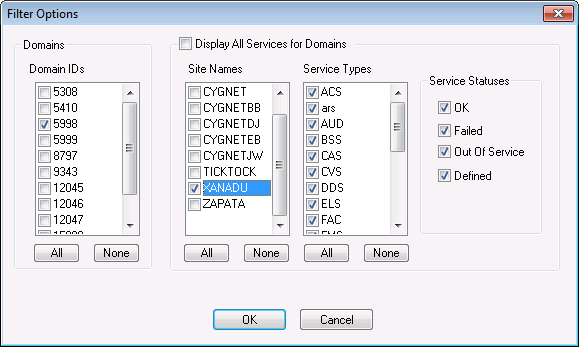
- To filter the service list, click Filter.
- Select the desired Domain ID, Site Names, Service Types and States.
- Click OK.
Note: You will need to add the desired domain using CygNet Domain Connection so the Domain ID is available for selection.
|
Filter Options |
- Select the service(s) for which you want to create the SVCMON point. To select a single service click on the service name. To select multiple services press Ctrl+Click. Use the None and All buttons to clear the selection or to select all, respectively.
- Click Get UDCs Available for Services to populate the second window.
- Select the UDC(s) then click the Add button (>>) to add them to the Points to Create list.
- To apply the properties of point template to the points to be created, click the Use Templates option.
- Click Create Info Item Points to create the points. The SVCMON point will be associated with the default timer.
- Once you have created a SVCMON point, the UDC will no longer be listed as an option for the selected service.
The created point will look like this:
|
Created Point |
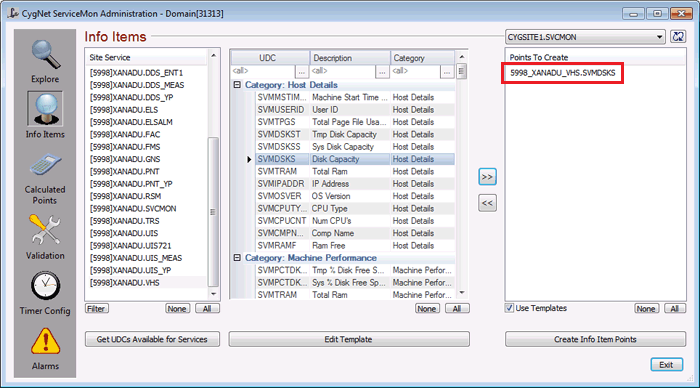
The syntax of the point's Facility ID is DOMAIN_SITE_SERVICE. Note that there is a 20 character limit for Facility ID. If the number of characters (including underscores) exceeds 20 the CygNet ServiceMon Administration utility will not create the point. The point will have to be added manually.
You can also create calculated points for services on other domains. See Creating Calculated Points for more information.
Notes:
For info items, the Facility ID syntax is DOMAIN_SITE_SERVICE. The UDC is the same. The General1 field of the PNT header record contains the source Site.Service. The Indexed1 field of the PNT header record contains the domain ID.
For calculated points, the Facility ID syntax is DOMAIN_SITE_SERVICE. The UDC is the same. The General1 field of the PNT header record contains the UDC of the calculated point. The Indexed1 field of the PNT header record contains the domain ID.


